
AI video models are moving beyond short clips created from simple text instructions. The newer generation of models can work with reference images, understand camera direction, generate sound, maintain subjects across changing shots, and even edit an existing video through natural language.
Three models show how different these approaches have become: Gemini Omni Flash, Kling 3.0, and Seedance 2.5.
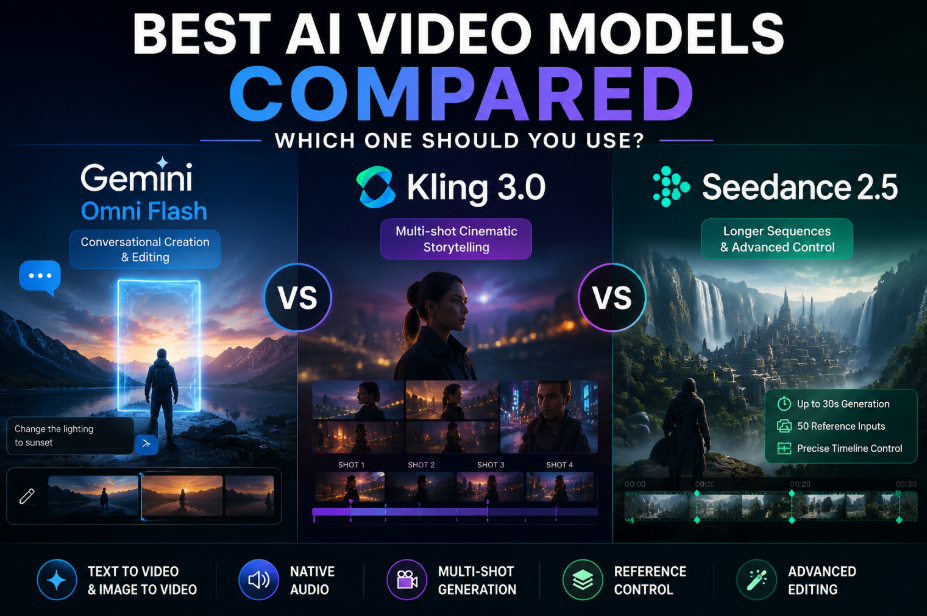
They overlap in several areas, but they are not interchangeable. Gemini Omni Flash is built around multimodal understanding and conversational editing. Kling 3.0 puts strong emphasis on multi-shot filmmaking, subject consistency, and native audio. Seedance 2.5 goes further into longer storytelling, large reference sets, and precise control over individual parts of a sequence.
So, which AI video model makes the most sense for your project? The answer depends on how you want to work.
Gemini Omni Flash vs. Kling 3.0 vs. Seedance 2.5 at a glance
| Feature | Gemini Omni Flash | Kling 3.0 | Seedance 2.5 |
| Main strength | Conversational creation and editing | Multi-shot cinematic scenes | Longer, reference-heavy storytelling |
| Text-to-video | Yes | Yes | Yes |
| Image-to-video | Yes | Yes | Yes |
| Native audio | Yes | Yes | Yes |
| Multi-shot generation | Yes, prompt-directed | Yes, dedicated multi-shot controls | Yes, with longer narrative sequences |
| Reference control | Multiple image references | Image, element and video references | Up to 50 mixed references |
| Editing | Conversational editing | Generation-focused controls | Timestamp and reference-based editing |
| Maximum single generation | Around 10 seconds in current examples | Up to 15 seconds | Up to 30 seconds |
| Best suited to | Iterative creative work | Cinematic scenes and dialogue | Ads, films and longer sequences |
The biggest difference is not simply visual quality. It is how much control each model gives you before and after generation.
What makes Gemini Omni Flash different?
Gemini Omni Flash is best understood as a video model that you can keep talking to.
Google designed it as a multimodal system that can process text, images, audio, and video while creating video with sound. More importantly, it supports conversational editing through the Interactions API. Instead of generating a clip and starting again whenever something is wrong, you can continue the conversation and request a focused change.
For example, you might generate a scene and then ask the model to change the lighting, remove an object, alter something in the background, or keep everything else unchanged while modifying one element. Google specifically recommends simple editing instructions when making these kinds of changes. Because of this, Gemini Omni Flash is helpful while the initial generation is just getting started.
Its understanding of Gemini’s wider knowledge also helps when prompts depend on physical behaviour, cultural context, locations, objects, or real-world relationships. Google positions this combination of world knowledge and multimodal understanding as one of the model’s main differences from earlier video systems.
There are still limits. The current API does not support video extension or interpolation between first and last frames. Uploaded audio references are also not supported, and uploaded video editing has regional restrictions.
Best for: producers that anticipate creating, reviewing, editing, and improving videos throughout multiple conversational runs.
Where does Kling 3.0 stand out?
Kling 3.0 is a stronger fit when the job is about building a cinematic scene with several planned shots inside one generation.
Its dedicated multi-shot mode can automatically plan framing, scene transitions, and camera-angle changes from the instruction. Creators have additional control over the timing of individual shots with a bespoke multi-shot option.
This matters for dialogue, shot-reverse-shot coverage, short narrative sequences, and scenes that need different camera positions without creating every angle separately.
Kling 3.0 also adds stronger element consistency. Characters, objects, and other important subjects can be tied to references so they remain recognisable when the camera or scene changes. The model supports multi-character coreference, which becomes particularly useful when several people appear in the same sequence.
Audio is generated with the video, and Kling 3.0 can produce dialogue in Chinese, English, Japanese, Korean, and Spanish. Its native audio system can also connect particular voices with particular characters, helping reduce confusion in scenes involving more than one speaker.
Single generations can run for up to 15 seconds, which gives it more room than many earlier short-clip systems while still keeping the focus on relatively compact scenes.
Best for: dialogue scenes, cinematic coverage, character-led sequences, and filmmakers who want direct control over several shots in one generation.
Why is Seedance 2.5 different from both?
Seedance 2.5 pushes AI video further toward longer-form scene building.
ByteDance increased single-pass generation to 30 seconds, twice the previous 15-second length. Within that time, the model can organise several connected shots into a narrative with a beginning, development, turning point, and ending rather than simply keeping one action running longer.
It also supports multiple rounds of extension. This means creators can continue an existing sequence while carrying forward subjects, environments, pacing, and the overall audiovisual language. Reference control is another major strength.
Seedance 2.5 can accept up to 30 images, 10 video clips, and 10 audio clips in one request, giving creators as many as 50 reference assets to guide a generation. These references can define characters, props, environments, motion, visual composition, voices, and other parts of a scene.
That makes a difference in projects where one text description is not enough. Instead of expecting the model to deduce everything from text, a scenario with multiple recurrent people, a particular setting, a defined camera movement, and several significant items can be grounded using distinct references.
Seedance 2.5 also moves further into editing. Timestamp-level instructions can control what happens during a particular part of a clip, while post-generation edits can target characters, actions, camera perspective, or other scene details without rebuilding the whole idea from the beginning.
As of August 2026, BytePlus ModelArk lists Seedance 2.5 with 480p, 720p, and 1080p output options, and the model is publicly accessible through its video generation API.
Best for: longer scenes, complex filmmaking, reference-heavy advertising, multi-character work, and projects that require detailed control over timing and continuity.
Which model is best for character and scene consistency?
There is no simple winner because each model approaches consistency differently.
Kling 3.0 gives creators strong element-reference tools inside compact multi-shot generations. This makes it a good choice when a character or product must survive several camera changes inside the same short sequence.
Seedance 2.5 offers the largest reference set of the three. If a scene involves many characters, props, locations, motion references, and audio cues, its ability to read up to 50 reference assets provides much more information to work from.
Gemini Omni Flash takes another route. Its strength is maintaining the context of an editing conversation, so a creator can keep refining an existing generation instead of rebuilding the description after every change.
For a complete film or campaign, however, model-level consistency is only part of the problem. Project context also has to survive when creators move from one shot or model to another.
This is where end-to-end AI-powered multimodal platforms such as invideo agent can sit above individual generation models. Its project memory stores scripts, characters, locations, and creative rules across a production, while its model-routing approach can send different shots to different models rather than forcing every scene through the same generator.
That approach matters because the best model for a dialogue scene may not be the best model for a 30-second continuous sequence or a clip that needs repeated conversational changes.
How Invideo Agent Brings Multiple AI Video Models Into One Workflow
Choosing the right AI video model is becoming less about finding a single winner and more about knowing which model fits each creative requirement. A cinematic dialogue scene, a product advertisement, and a long-form sequence may all need different generation strengths.
This is where an agent-based workflow becomes valuable. Invideo Agent works as an AI filmmaking collaborator that helps creators move from an idea to a finished video by supporting writing, planning, generation, and editing across an entire project. Instead of working like a single prompt-based generator, it acts more like a creative crew that follows the director’s vision throughout production.
One of its biggest advantages is that it brings 200+ models into one place. Creators can access leading video, image, audio, and music models, including options such as VEO, Sora, Kling, and Nano Banana, while the agent helps route different shots to the model best suited for that specific requirement.
This model flexibility matters because every shot has different demands. One scene may require realistic character movement, another may need a specific visual style, while another might depend on image references or audio consistency. Rather than forcing an entire project through one generation engine, invideo agent helps creators combine different AI capabilities while keeping the overall creative direction connected.
The difference becomes even clearer in larger projects where consistency matters. Invideo Agent maintains project context across shots, scenes, and episodes, keeping characters, products, locations, and visual style aligned throughout the production. This persistent memory helps solve one of the biggest challenges in AI filmmaking: keeping every generated scene connected to the original creative intent.
Creators can also build specialised workflows using role-based agents, such as a casting agent, director of photography, or assistant director, allowing different parts of production to work together inside the same project. This approach makes AI video creation feel closer to managing a production team rather than repeatedly writing isolated prompts.
For filmmakers, brands, and creative teams comparing models like Gemini Omni Flash, Kling 3.0, and Seedance 2.5, this approach changes the question from “Which model should I use?” to “Which model is best for each part of my project?” From the initial concept to the final edit, a connected AI filmmaking workflow enables creators to leverage the advantages of many models while preserving consistency.
Final verdict
Gemini Omni Flash, Kling 3.0, and Seedance 2.5 each bring different strengths to AI video creation. Gemini Omni Flash works well for conversational generation and editing, Kling 3.0 focuses on cinematic multi-shot scenes, and Seedance 2.5 is built for longer sequences with extensive reference control.
However, AI video is moving beyond choosing a single model. Different shots often require different capabilities, which makes a connected workflow more valuable.
Invideo Agent helps bring these models together by providing access to 200+ video, image, audio, and music models, including leading models such as VEO, Sora, Kling, and Nano Banana. It supports per-shot model routing, helping creators choose the right model for each creative requirement while keeping the entire project connected.
The future of AI video may not be about finding one perfect model, but about combining the right models with a workflow that understands the complete creative vision.