
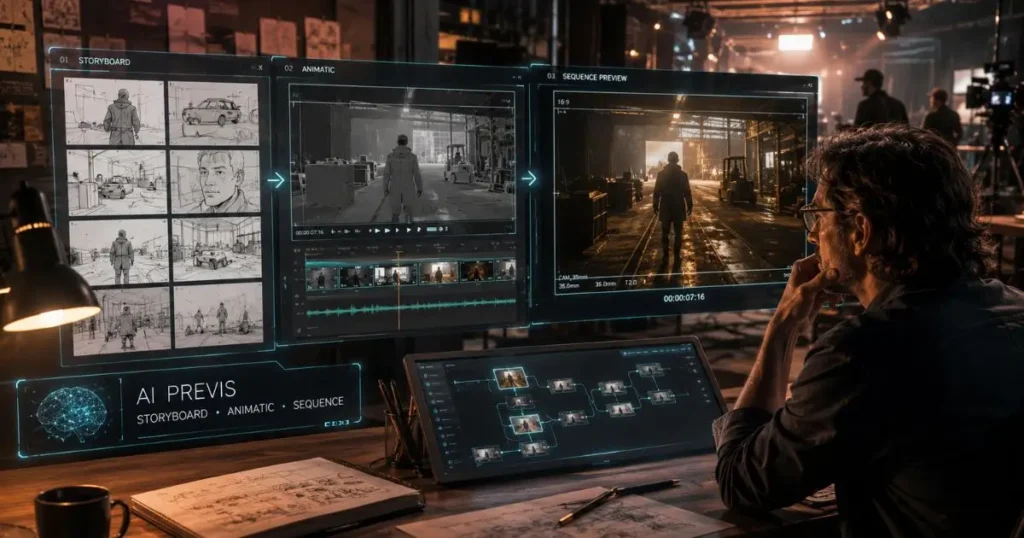
Film previsualization helps directors understand how a scene will look before production begins, but traditional previs workflows can take significant time and resources. Creating storyboards, animatics, camera tests, and visual references often requires multiple specialists before a team can even start shooting.
AI-powered filmmaking tools are changing this process by helping creators move from scripts and concepts to visual sequences faster. Instead of spending days building early visual concepts manually, filmmakers can explore camera choices, pacing, environments, and character movement before committing production budgets.
This list covers the best AI tools for creating film previsualizations faster, including platforms that support storyboards, animatics, AI-generated sequences, and complete creative planning workflows.
How We Evaluated These AI Previsualization Tools
We evaluated these tools based on:
- Ability to create storyboards, animatics, or moving previs sequences
- Support for camera planning and shot exploration
- Character and environment consistency
- Ease of moving from concept to production planning
- Flexibility for filmmakers, studios, agencies, and creative teams
- Pricing accessibility and overall workflow value
Best AI Tools for Film Previsualization
| Tool | Best For | Key Strength |
| Invideo Agent | Complete AI filmmaking workflows | Context-aware previs, storyboards, animatics, and sequence planning |
| Storyboarder | Quick visual planning | Simple storyboard creation |
| Boords | Collaborative storyboarding | Team feedback and animatic creation |
| Krock.io | Creative collaboration | Review and approval workflows |
| FrameForge | Traditional film previs | Camera blocking and shot planning |
| Blender | Advanced 3D previs | Custom environments and animation control |
1. Invideo Agent
Invideo Agent is an AI filmmaking collaborator designed for creators who need to plan, visualize, and develop complete video projects. Instead of treating previs as a separate task, it connects planning with the wider filmmaking workflow by understanding the script, characters, locations, references, and creative direction behind a project.
A major advantage for filmmakers is project memory. The platform keeps important details such as character information, visual style, locations, and references consistent throughout the process. This helps teams explore scenes without repeatedly rebuilding the same creative foundation.
For previsualization specifically, creators can use AI previsualization to previsualize sequences before shooting. Directors can guide invideo Agent to create the previs they need, whether that means a storyboard, an animatic, or a more complete visual sequence. The workflow starts from existing material such as scripts, shot breakdowns, cast sheets, location references, or visual inspiration, allowing the agent to build visuals based on the project context.
Invideo Agent Two expands the AI filmmaking workflow with stronger project understanding and faster creative assistance. It is designed for creators working on multi-scene projects where memory, collaboration, and consistency matter.
Agent Two can understand different project materials, including scripts, PDFs, videos, brand documents, and reference files. It can also work with specialized expert agents such as a director of photography agent, casting agent, or storyboard artist agent that share the same project context.
Key Features
- Creates storyboards, moving animatics, and visual sequence previews
- Maintains character, location, and style consistency across shots
- Converts creative direction into model-specific generation instructions
- Supports camera movement exploration and visual treatment testing
- Uses multiple AI models depending on the requirements of each shot
Best For
- Directors planning complex scenes
- Independent filmmakers creating proof-of-concepts
- Production teams preparing pitches
- Studios developing short films, series, and brand films
Use Cases
Filmmakers can test different camera approaches, explore scene pacing, develop visual styles, and review sequences before production begins. It can also help teams create pitch materials and early visual references without investing heavily in production resources.
Where It Falls Short
Creators looking for only a simple storyboard drawing tool may find the broader filmmaking workflow unnecessary. It is designed more for iterative creative projects than one-off image generation.
Pricing
Pricing varies based on the invideo subscription plans and usage requirements.
2. Storyboarder
Storyboarder is a lightweight tool focused on helping filmmakers quickly sketch and organize scenes before production. It allows creators to arrange shots visually and communicate ideas with production teams without requiring advanced animation skills.
Key Features
- Simple storyboard creation workflow
- Shot sequencing and visual planning
- Support for early creative discussions
- Useful drawing and annotation tools
Best For
- Beginner filmmakers
- Directors creating early concepts
- Small production teams
Use Cases
Storyboarder works well when directors need to quickly map scenes, communicate camera ideas, or create a visual outline before moving into detailed production planning.
Where It Falls Short
It focuses mainly on static storyboards rather than generating complete AI-based sequences, moving previews, or maintaining long-term project continuity.
Pricing
Available as a free tool.
3. Boords
Boords is a collaborative storyboarding platform designed for teams that need to create, review, and share visual plans during production. It combines storyboard creation with tools for turning boards into simple animatics.
Key Features
- Storyboard creation and editing
- Animatic creation with timing and audio
- Collaboration features
- Review and feedback workflows
Best For
- Agencies
- Marketing teams
- Production groups working remotely
Use Cases
Teams can use Boords to transform scripts into visual sequences, review creative direction with clients, and refine scenes before filming begins.
Where It Falls Short
It is focused more on storyboard collaboration than complete AI filmmaking workflows involving character memory, visual consistency, or automated shot generation.
Pricing
Offers paid plans based on team and feature requirements.
4. Krock.io
Krock.io focuses on creative production management and collaboration. It helps animation and video teams organize reviews, feedback, and approvals throughout the creative process.
Key Features
- Creative review workflows
- Feedback management
- Team collaboration tools
- Version tracking
Best For
- Animation studios
- Creative agencies
- Teams managing multiple revisions
Use Cases
Production teams can use Krock.io to collect feedback on storyboards, animation drafts, and creative assets before final production.
Where It Falls Short
It is primarily a collaboration platform rather than a tool built specifically for generating AI-powered previs sequences.
Pricing
Pricing depends on workspace requirements and available plans.
5. FrameForge
FrameForge is a dedicated previs tool designed for filmmakers who want detailed control over camera placement, blocking, and scene planning. It focuses on recreating filmmaking decisions digitally before a real shoot.
Key Features
- Virtual camera placement
- Shot composition planning
- Character blocking
- Scene visualization
Best For
- Film directors
- Cinematographers
- Professional production teams
Use Cases
Directors can plan camera angles, lens choices, and actor movement before arriving on set, reducing uncertainty during production.
Where It Falls Short
It requires more manual setup compared with AI-powered tools that can generate visual concepts from scripts and references.
Pricing
Available through paid licensing options.
6. Blender
Blender is a powerful open-source 3D creation platform used for animation, modeling, and visual effects. Many filmmakers use it for advanced previs when they need detailed control over environments and camera movements.
Key Features
- 3D modeling and animation
- Virtual cameras
- Lighting control
- Advanced scene creation
Best For
- VFX teams
- Animation professionals
- Experienced creators
Use Cases
Blender can help production teams create detailed digital versions of environments, test complex shots, and plan visual effects-heavy sequences.
Where It Falls Short
The learning curve is much higher compared with AI-driven tools that automate parts of the previs process.
Pricing
Free and open source.
How to Choose the Right AI Previs Tool
The right tool depends on the level of control and speed your project requires.
Choose an AI filmmaking platform when you need:
- Faster concept exploration from scripts and references
- Character and environment consistency across multiple scenes
- Multiple visual options before production decisions
Choose a storyboard tool when you need:
- Simple scene planning
- Quick shot communication
- Basic visual outlines
Choose a 3D previs tool when you need:
- Detailed camera blocking
- Complex action planning
- Virtual production preparation
Common Mistakes to Avoid When Choosing a Previs Tool
- Choosing a tool without checking whether it supports your production workflow
- Ignoring collaboration requirements for larger teams
- Focusing only on image quality instead of consistency and planning features
- Not considering how easily previs assets can move into production
Creators should also consider how AI fits into the broader workflow. For example, AI Content Optimization can help teams refine messaging, structure creative assets, and improve how content performs after production. Previs is only one part of a larger content creation process.
Final Thoughts
AI previsualization tools are making it easier for filmmakers to test ideas before production begins. From simple storyboards to complete moving sequences, these platforms help teams understand pacing, camera choices, and visual direction earlier in the process.
The best choice depends on your workflow. Simple projects may only need storyboarding tools, while larger productions can benefit from AI platforms that connect planning, generation, and editing in one environment.
As AI continues becoming part of filmmaking workflows, which previs tool do you think will become the most useful for modern creators?
Frequently Asked Questions
What is AI previsualization in filmmaking?
AI previsualization uses artificial intelligence to create early visual versions of scenes before filming. It can generate storyboards, animatics, and sequence previews to help filmmakers test camera choices, pacing, and creative direction.
Can AI tools create complete film previs sequences?
Yes, some AI filmmaking tools can create moving previews based on scripts, references, and project details. These tools help directors explore scenes before committing production resources.
What is the difference between storyboards and AI previs?
Storyboards are usually static images showing individual shots. AI previs can create moving sequences that demonstrate timing, camera movement, and scene flow before production.
Do filmmakers still need traditional previs methods?
Traditional previs remains useful for highly technical productions. AI previs is often used alongside traditional methods to speed up creative exploration and early decision-making.
Can AI previs maintain character consistency?
Some AI filmmaking tools focus on maintaining character and environment consistency across multiple shots by using project memory and reference information.
Who uses AI previsualization tools?
Directors, production teams, agencies, VFX artists, and independent filmmakers use AI previs tools to plan scenes, develop pitches, and reduce uncertainty before shooting.
What should I prepare before creating AI previs?
A script, shot list, character details, location references, or visual inspiration can help create more accurate previs results. Some tools can also start from rough concepts and build visuals gradually.