
As search engines become more intelligent, competition in most industries is becoming stronger, and users are demanding high-quality, useful content on all pages as soon as they visit them; thus, you must master on-page SEO to better your chances of having a ranking website, attracting regular traffic, and converting visitors to clients. In this guide, you’ll learn the most effective on-page SEO tips that actually work today, not outdated tactics, but strategies aligned with current search behaviour, user intent, and modern ranking algorithms.
This article breaks down every essential element of on-page optimization, covering practical examples, common mistakes, and actionable methods you can apply immediately to improve your website performance.
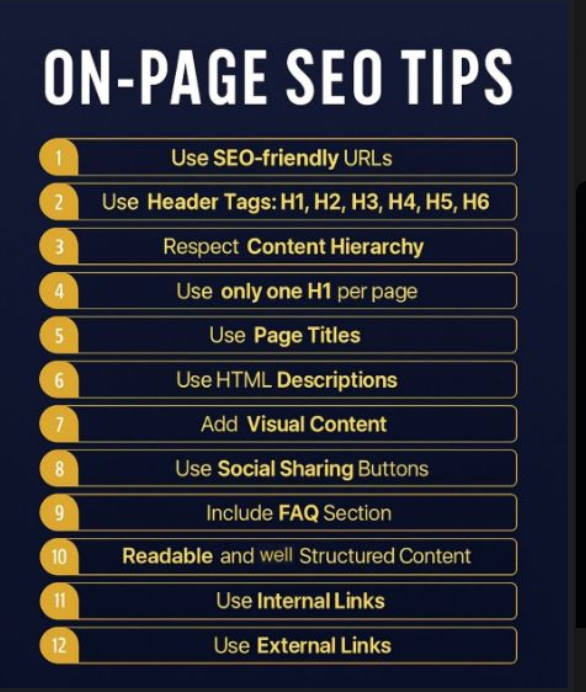
Use SEO-Friendly URLs
Search engine optimization (SEO) friendly URLs are not only great clean links for websites but also provide context to the search engines and enhance the user’s overall experience. A clean URL is a best practice as it indicates the page via the searcher’s intent and increases click-through rates.
What an SEO-friendly URL includes
- Short and descriptive text
- The primary keyword
- No unnecessary numbers or symbols
- Hyphens between words to improve readability
Why it matters
Search Engine Optimization (SEO) Friendly URLs appear in the search results, browser Tabs, Social Sharing, and backlink previews. Clean structures signal trust and relevance.
Example of a strong URL
Instead of something messy or automated, a clear structure improves both ranking potential and user experience.
Use Header Tags H1 – H6
Header Tags guide search engines through your content and allow users to quickly scan for the information they are looking for. Header tags also provide structure to long-form articles, enhance the readability of articles, and match content with the intent of your users.
Best practices
- Use one H1 per page
- Break content into logical H2 sections
- Use H3–H6 for subpoints or deeper explanations
Why headers help SEO
Search engines analyze your headers to understand what your page is about. A clear hierarchy increases your chances of securing rich snippets, featured snippets, and better placement for long-tail keywords.
Practical tip
Structure your page like a table of contents. Every major point gets an H2, and supporting information goes under H3S.
Respect Content Hierarchy
Content hierarchy means organizing your article in a logical, helpful flow. Visitors should find answers quickly without scrolling endlessly or reading irrelevant information.
How to create an effective hierarchy
- Start with an introduction that sets context
- Follow with sections that answer user intent
- Use bullet points, lists, tables, and short paragraphs
- Place important information near the top
- Add supporting details later in the article
Why hierarchy improves rankings
Search engines prioritize pages that keep users engaged. Clear structure lowers bounce rate, increases time on page, and improves clarity, all strong user signals.
Use Only One H1 Per Page
Your H1 is the “title” of your content. Using more than one confuses both search engines and readers. This is one of the simplest but most important on-page SEO tips.
The benefits of using H1
- Identifies the main subject of your page.
- Assists in the categorization of your page by the search engines.
- Gives your users an enjoyable reading experience.
The placement of your H1
The H1 must be at the top of your content, must be short and related to your keyword, and should be easy to read.
Use Page Titles
Your page title (meta title) is one of the strongest ranking factors. It appears in search results and directly impacts click-through rate.
A strong page title includes
- The focus keyword once
- A clear promise
- A benefit for the reader
- A natural tone avoids keyword stuffing
Tips for writing engaging titles
- Highlight a benefit
- Use action words
- Communicate clearly what users will learn
Using page titles strategically increases visibility, clicks, and relevance.
Use HTML Descriptions
The use of HTML Descriptions (also known as a meta description) provides a means for users to quickly assess and determine if your page answers their query, but while they have no direct impact on rankings within a search engine, they do have a strong influence on click-through rates, which ultimately lead to improved rankings.
Here are Four Tips to Keep in Mind When Writing Effective HTML Descriptions:
- Be Concise.
- Use Your Keywords Naturally.
- Include a Password/Offer/Summary (what is being offered) in the Description.
- Make the Description Relevant to the User’s Intent.
Importance of Meta Descriptions:
Meta descriptions are visible on a search engine results page beneath the Title of the Page. The more effective meta descriptions result in greater engagement and an increased interest from visitors, matching the target audience.
Add Visual Content
Modern users prefer visual content over long paragraphs of plain text. Adding relevant visuals improves engagement, retention, and comprehension.
Types of visual content
- Infographics
- Diagrams
- Screenshots
- Illustrations
- Icons
- Short clips or GIFs
- Graphs or tables
SEO benefits
- Lower bounce rate
- Longer dwell time
- Higher shareability
- Better communication of complex information
Optimize visuals for SEO
- Use descriptive alt text.
- Compress images
- Choose mobile-friendly dimensions
This makes content more interactive and ranking-friendly.
Use Social Sharing Buttons
Social sharing buttons help readers share your content instantly. The more your article is shared, the more visibility you gain and higher visibility often leads to natural backlinks.
Why social buttons matter
- Increase reach
- Improve engagement
- Bring traffic from social platforms
- Support brand awareness
Best placement
- Above the article
- Floating on the side
- At the end of the content
Make sharing frictionless to encourage organic promotion.
Include FAQ Section
FAQs strengthen your content and directly respond to user intent. They help capture featured snippet positions, especially for question-based queries.
Adding a FAQ Section has several benefits, including:
- Enhances Relevance
- Enhances the Capturing of Long Tail Keywords
- Relieves Objections
- Enhanced User Experience
- Increases Ability for Voice Search
Tip: Answer the Questions Simply, Directly and with a Solution-Focused Approach
Readable Content and Structured Content
Readability on your website creates engagement with your users and reduces bounce rates. Having well-structured content will be easy for search engines to read and help improve your rankings.
Attributes of Readable Content Include:
- Short Sentences
- Short Paragraphs
- Bullet Points
- Logical Transitions
- Simple Language
- Relevant Examples
Mobile Readability Factor (a clean formatting improves access to site content and provides the user with a seamless user experience via different screen sizes).
Utilize Internal Links
Internal links guide users to explore more of your site and make it easier for search engines to see all of your pages.
Reasons to utilize internal links
- Increase the authority of a given page is divided among your other pages
- Decrease the number of users who bounce back from your site
- Assist users in finding other relevant or similar information
- Clarifying to search engines how your topics connect
How to create internal links
- Link in a natural way
- Use descriptive anchors
- Connect to topics that are connected
- Ensure your links open properly and smoothly
Utilizing the above practices of creating internal links to your content will greatly strengthen your site’s overall SEO effectiveness.
Utilize External Links
External linking will help to add credibility to your content as well as help to create trust with users. It shows the search engines that there is a credible source supporting your information.
Benefits of External Links for SEO
- Provides authority to your content
- Supports E-E-A-T principles (Expertise, Authoritativeness, Trustworthiness)
- Provides additional sources for reference
- Provides more value to the user’s experience
Best Practices for Using External Links
- Only link to relevant, credible sources
- Do not link to low-quality or non-reputable pages
- The reference should naturally support your claims in your content.
Frequently Asked Questions
1. What is the most important on-page SEO factor?
There isn’t just one. Search engines evaluate a combination of elements like content quality, keyword optimization, user intent, page structure, and internal linking.
2. How many times should I use my keyword?
Use your focus keyword naturally around three to five times, supported with synonyms and related terms to maintain readability and avoid keyword stuffing.
3. Do images help with SEO?
Yes. Optimized visuals increase engagement and reduce bounce rate. Use alt text, compress files, and ensure mobile-friendly sizing.
4. What are the benefits of internal linking?
Internal links improve search engines’ understanding of your website’s structure. Internal links help provide authority, improve the transfer of authority between different pages of your website, and increase the time spent on your site by visitors.
5. Do meta descriptions affect search engine ranking?
Meta descriptions are not directly associated with search engine ranking; however, they are heavily influential to click-through rates, and click-through rates do indirectly affect search engine visibility.
Final Words:
Focus on providing a high-quality experience for the person reading your content, rather than stuffing a bunch of keywords in there. If the content is well-written, organized, informative, visually appealing, and technically sound, then Search Engines are likely to see that content as relevant and therefore favour it with better ranking positions.
Use the On-Page SEO techniques discussed in this guide to enhance the performance of your website over time by implementing clean URLs, clear headers, images (videos), reference sites (internal and external links), well-written metadata and appearance formats that are easy to read. In doing so, you will increase your credibility, gain a higher volume of organic visitors and stand out among others in highly competitive niches.
If you wish to maximize visibility and generate higher performance from your website, and gain search engine ranking for your content, follow the above steps now and continue your optimization efforts as your site develops.