
If your website is not showing up on Google, the problem might not be your content. It could be something deeper, something most people never check.
That’s technical SEO.
In this guide, you’ll learn exactly what is technical SEO, why it matters, and how to fix common issues. Whether you run a business in the UAE or manage a website for clients, this blog will help you understand everything step by step.
What Does Technical SEO Mean?
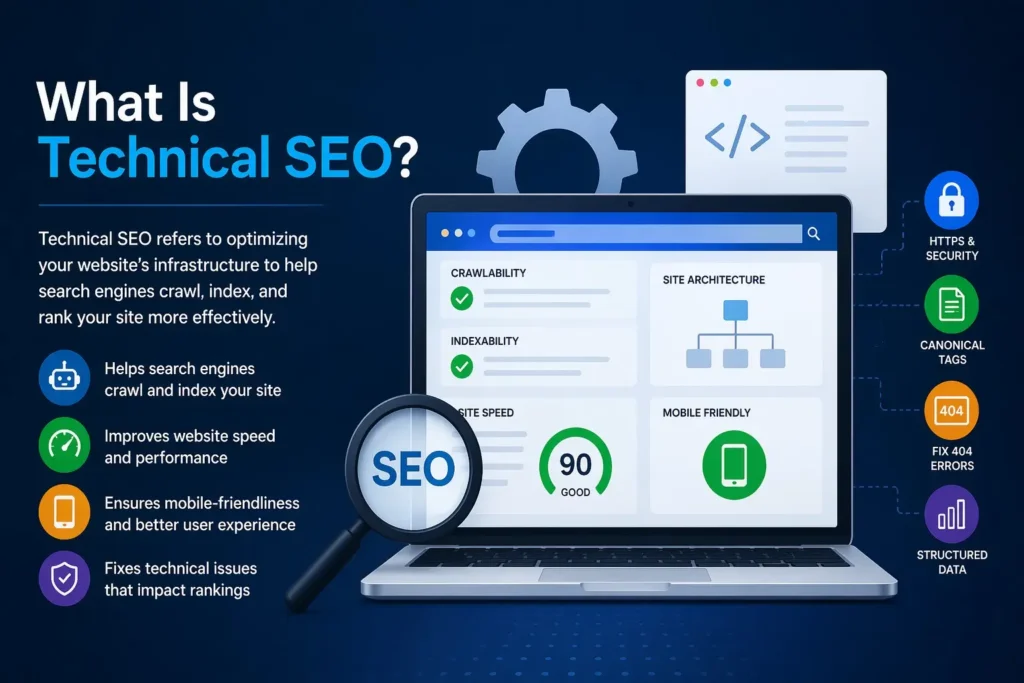
Technical SEO is the process of improving your website’s backend so search engines can find it, read it, and rank it.
Think of it this way. Google sends bots to visit your website. These bots check how fast it loads, how it’s structured, and whether it’s safe. If your site has problems, the bots leave without indexing your pages.
No indexing = no ranking.
That’s what technical SEO fixes.
A simple example: if your website takes 10 seconds to load, Google will not rank it. But if you compress images and fix your server speed, load time drops, and rankings improve. That’s technical SEO in action.
It is called “technical” because it deals with the structure and code of your website, not just the words on the page.
Technical SEO vs On-Page SEO | What’s the Difference?
People often mix these two up. They are different.
On-page SEO is about what your visitors see:
- Keywords in your content
- Meta titles and descriptions
- Headings (H1, H2, H3)
- Internal links
Technical SEO is about what happens behind the scenes:
- How fast your pages load
- Whether search engines can crawl your site
- How your website is structured
- Whether your site is secure (HTTPS)
Here’s the simple rule: on-page SEO speaks to your readers. Technical SEO speaks to search engines.
Both are important. But if your technical SEO is broken, even great content won’t rank.
Key Technical SEO Elements
Several core elements make up technical SEO. Let’s go through each one.
1. Site Speed & Core Web Vitals
Speed is everything. Google uses Core Web Vitals to measure how fast and smooth your website feels.
Three main signals:
- LCP – how long does it take for the main content to load
- CLS – how much the page jumps around while loading
- INP – how quickly your site responds to clicks
A slow site frustrates users. They leave. Google notices. Your rankings drop.
Quick fixes:
- Compress your images
- Remove unused plugins
- Use faster hosting
- Enable browser caching
2. Crawlability & Indexability
Crawlability means Google can visit your pages. Indexability means Google can store and show them in search results.
If Google cannot crawl a page, it won’t rank, no matter how good your content is.
Two key files control this:
- Robots.txt – tells Google which pages to crawl or skip
- XML Sitemap – shows Google a map of all your pages
Check your robots.txt regularly. A small mistake there can block your entire website from Google.
3. Mobile-Friendliness
Over 70% of web traffic in the UAE comes from mobile devices.
Google uses mobile-first indexing. This means Google looks at your mobile version first when deciding your rank.
If your website looks broken on phones, your rankings will suffer even if it looks perfect on desktop.
Test your site using Google’s Mobile-Friendly Test tool. It’s free and takes 30 seconds.
4. HTTPS & Site Security
HTTPS means your site has an SSL certificate. It protects user data. Google marks sites without HTTPS as “Not Secure.”
Would you trust a website that says “Not Secure” in the browser? Neither would your visitors.
Google gives a ranking boost to HTTPS sites. It’s a simple fix, and it builds trust instantly.
5. Structured Data & Schema Markup
Schema markup is code you add to your pages to help Google understand what your content is about.
For example, a schema can tell Google:
- “This is a product page.”
- “This is a recipe.”
- “This is a local business.”
When Google understands your content better, it can display rich results like star ratings, FAQs, and prices directly in search results. These stand out and get more clicks.
6. XML Sitemap & Robots.txt
Your XML sitemap is like a table of contents for your website. It lists all your important pages so Google doesn’t miss any.
Your robots.txt file tells Google what it can and cannot crawl.
Both need to be correctly set up. A wrong entry in robots.txt can accidentally block Google from your best pages.
What Are Technical SEO Issues to Watch Out For?
Here are the most common technical SEO problems that hurt websites:
- Broken links (404 errors): Pages that no longer exist
- Duplicate content: Same content appearing on multiple URLs
- Slow page speed: Takes too long to load
- Missing meta tags: No title or description set for pages
- Crawl errors: Google can’t access certain pages
- Mixed content: HTTPS site loading some elements over HTTP
- Redirect chains: Too many redirects are slowing things down
- No mobile optimisation: Site doesn’t work well on phones
These issues might seem small. But they add up. Each one sends a negative signal to Google.
If you’re not sure whether your site has these problems, a technical SEO audit will show you exactly where to start.
Are Backlinks Part of Technical SEO?
No, backlinks are off-page SEO, not technical SEO.
Backlinks are links from other websites pointing to yours. They build your authority and trust in Google’s eyes.
Technical SEO is all about your own website’s structure and performance. Off-page SEO is about signals from outside your website.
Here’s a simple breakdown:
- Technical SEO = how your website works
- On-page SEO = what’s on your pages
- Off-page SEO = what other sites say about you
All three work together. But they are separate areas of SEO.
The Three Main Goals of Technical SEO
Every technical SEO strategy focuses on three core goals:
1. Make your site easy to crawl: Google bots should be able to visit every important page on your website without errors or blocks.
2. Make sure pages are properly indexed: Once Google crawls your pages, they need to be stored in Google’s database. Without indexing, your pages can’t appear in search results.
3. Improve user experience: Fast loading, mobile-friendly, secure, and easy to navigate. When users have a good experience, Google takes note and rewards your rankings.
These three goals are the foundation of everything in technical SEO.
How Technical SEO Works
Here’s a simple breakdown of what happens when Google visits your website:
- Google sends a bot (called Googlebot) to your website
- The bot follows links and discovers your pages
- It checks page speed, structure, and security
- It reads your sitemap and robots.txt
- It decides which pages to index
- Indexed pages appear in search results
If any step in this process is broken, your pages won’t rank.
Technical SEO makes sure every step runs smoothly. It clears the path so Google can do its job and reward your website with better rankings.
How to Optimise Technical SEO | Step by Step
Don’t know where to start? Follow this process.
Step 1: Run a Technical SEO Audit
Use tools like:
- Google Search Console (free)
- Screaming Frog (free up to 500 URLs)
- Ahrefs or SEMrush (paid)
These tools will show all crawl errors, broken links, slow pages, and missing tags.
Step 2: Fix Crawl Errors
Go to Google Search Console → Coverage Report. Fix any pages showing errors. Check your robots.txt and make sure no important pages are blocked.
Step 3: Improve Page Speed
- Compress all images before uploading
- Use a caching plugin (like WP Rocket on WordPress)
- Remove plugins you don’t use
- Switch to faster hosting if needed
Step 4: Secure Your Site with HTTPS
If your site is still on HTTP, install an SSL certificate. Most hosting providers offer this for free. It takes minutes to set up and instantly improves trust and rankings.
Technical SEO Checklist for UAE Businesses
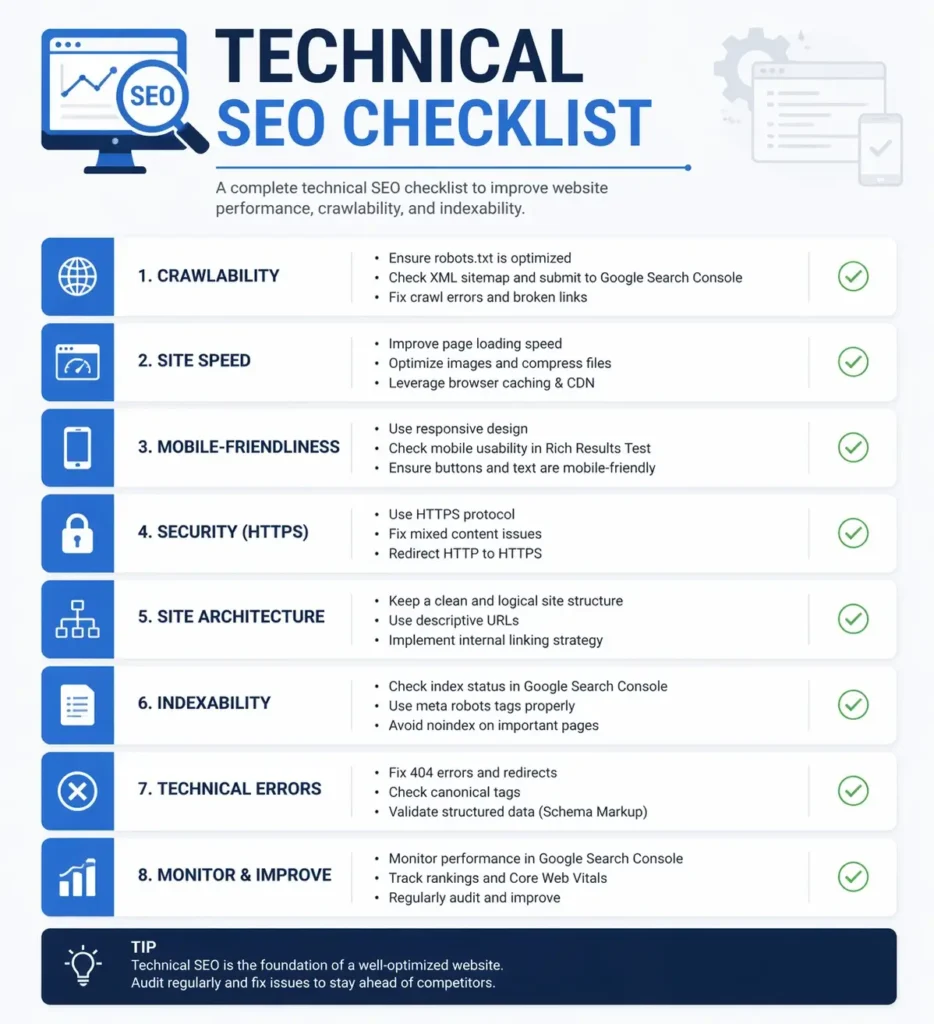
Use this checklist to make sure your website is technically healthy:
- HTTPS is installed and working
- XML sitemap submitted to Google Search Console
- Robots.txt file configured correctly
- No crawl errors in Google Search Console
- All pages load in under 3 seconds
- Website is mobile-friendly
- No broken links or 404 errors
- No duplicate content issues
- Core Web Vitals passing (LCP, CLS, INP)
- Schema markup added to key pages
- Clean, keyword-friendly URL structure
- Images are compressed and have alt text
- No redirect chains or loops
Run through this list every 3 months. Regular audits keep your site healthy and rankings strong.
How to Check Your Technical SEO (Free & Paid Tools)
You don’t need to hire a developer to check your technical SEO. There are great tools available.
Free tools:
- Google Search Console: Best starting point. Shows crawl errors, index coverage, and Core Web Vitals
- Google PageSpeed Insights: Tests your site speed on mobile and desktop
- Screaming Frog: Crawls your website like Google does (free up to 500 pages)
- GTmetrix: Shows detailed speed analysis
Paid tools:
- Ahrefs Site Audit: Full technical audit with issue reports
- SEMrush Site Audit: Detailed issue finder and tracking
- Moz Pro: Good for beginners
Start with Google Search Console. It’s free, accurate, and directly connected to how Google sees your site.
Why Technical SEO Matters for Your Business
You could have the best content in the UAE. But if your website has technical issues, no one will ever see it.
Here’s why technical SEO is so important:
- Better rankings: Google rewards technically sound websites
- More organic traffic: higher rankings = more visitors
- Better user experience: Fast, secure, mobile-friendly sites keep visitors longer
- Lower bounce rate: Slow or broken sites make people leave immediately
- More conversions: A smooth website turns visitors into customers.
In a competitive market like the UAE, where hundreds of businesses target the same keywords, technical SEO is often the edge that separates a ranking website from one that nobody finds.
At Rankwithmahnoor, we offer full technical SEO services that cover everything from site audits to speed optimisation to structured data. Our team identifies and fixes the exact issues holding your website back, so you can focus on growing your business.
Don’t let technical issues ruin your rankings. Get your website audited today.
Frequently Asked Questions
Q1: What is technical SEO?
It’s the process of fixing your website’s backend speed, structure, and security so search engines can crawl and rank it properly.
Q2: Is technical SEO different from on-page SEO?
Yes. On-page SEO is about content and keywords. Technical SEO is about how your website is built and functions.
Q3: What are the main goals of technical SEO?
Making your site easy to crawl, properly indexed, and fast for users, these three goals drive everything.
Q4: How do I check my technical SEO?
Use Google Search Console (free) or tools like Screaming Frog and Ahrefs to run a full site audit.
Q5: Are backlinks part of technical SEO?
No. Backlinks are off-page SEO. Technical SEO only covers what happens on and within your own website.